

📸 TRY THE LIVE DEMO FIRST
Scan the QR code in the listing photos with your phone camera, or paste this link into your browser:
https://weddinginvitestudio.my.canva.site/photo-booth-save-the-date-arch-card
Press the button and watch the strip print, exactly the way your guests will.
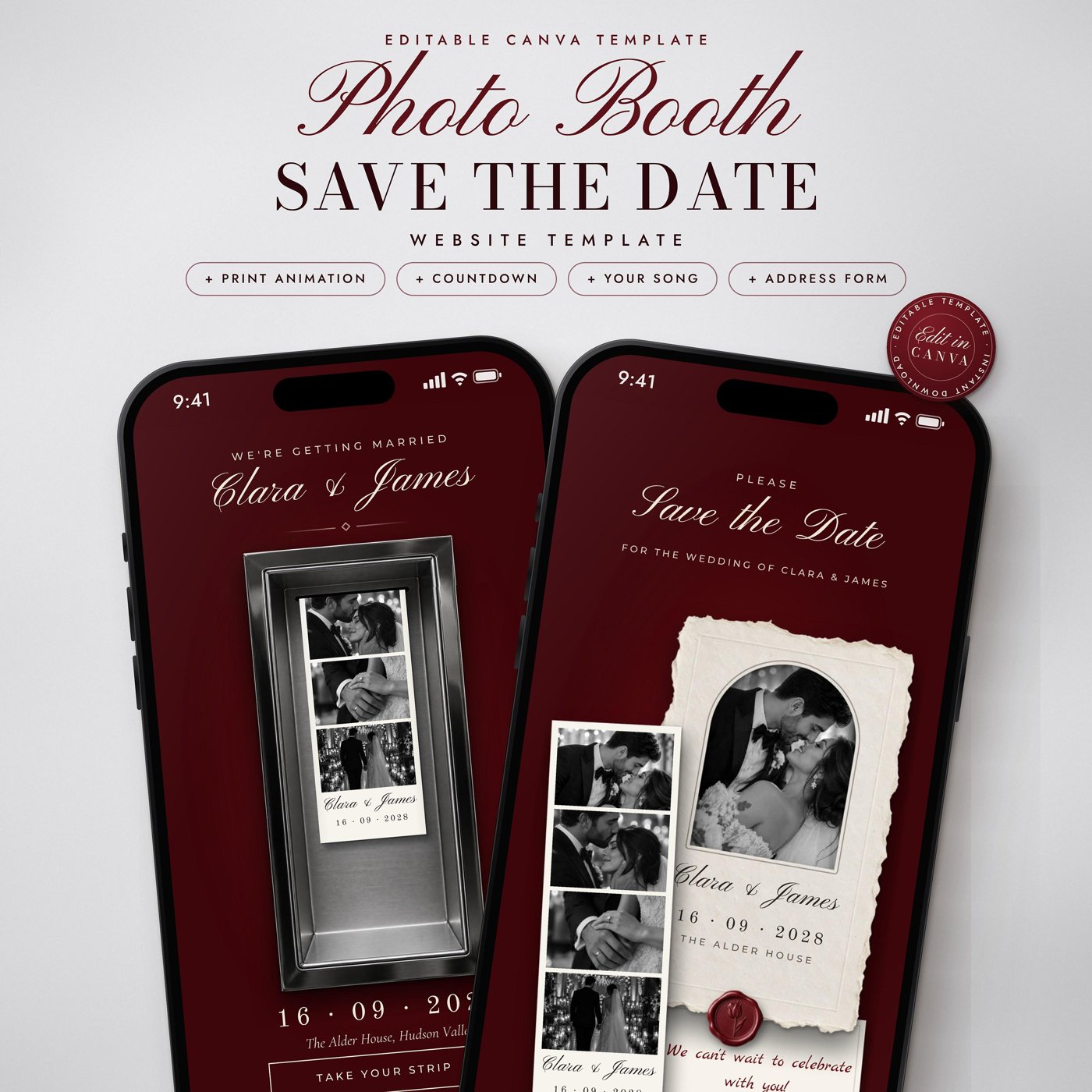
Step into the photo booth. This save the date is a real mini website your guests open on their phone: they press the button, and a photo strip with your four photos, your names and your date prints out of a steel photo booth window. Then they take their strip and open your save the date.
Shown as a save the date, but every word, photo and date is editable, so it works just as well for an engagement party, a wedding invitation, an anniversary or a birthday.
🥀 THE LOOK
Deep burgundy red, brushed steel, ivory paper, black and white photos, a wax seal and a single white tulip. Elegant, romantic and a little bit playful, made for a burgundy wedding, a fall or winter wedding, a black tie evening or any couple who love a photo booth.
✨ WHAT YOUR GUESTS SEE
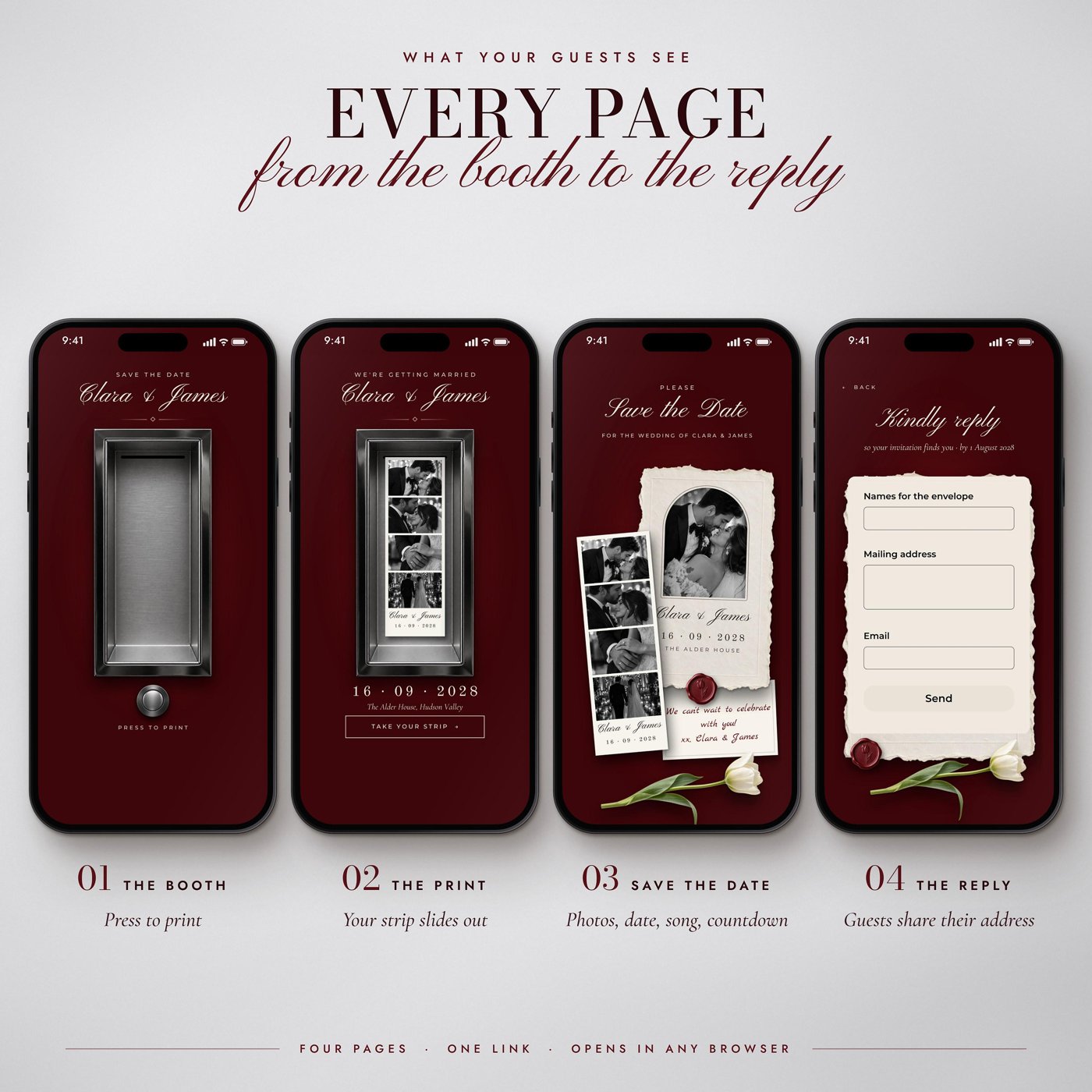
🔴 The booth: your names, a steel photo booth window and a PRESS TO PRINT button they tap
🎞 The print: your photo strip slides out of the slot with your four photos, your names and your date
💌 The save the date: an arched portrait on a deckle-edge card with your names, date and venue, your photo strip beside it, a wax seal and a note in handwriting
🎵 Play our song: a play button for your favourite song (any YouTube song)
⏳ A live countdown that ticks down to your wedding day
🎬 A short clip or photo of the two of you, and your contact email
✉️ The reply: a short form where guests share their mailing address for the formal invitation
📲 MADE FOR PHONES
Designed for phone screens. On a laptop the same page sits centred on the deep red wall.
✉️ ADDRESS COLLECTION BUILT IN
Guests reply on the website itself: names for the envelope, mailing address and email. Replies arrive in your own Canva design and you can download them as a spreadsheet (CSV). Guests don't need an account, an app or a password.
🖌 EDIT IT IN CANVA
✔ Change all text, fonts and text colours
✔ Put your own photos on the strip and on the save the date page
✔ Change the names, date and venue
✔ Add your song (any YouTube link)
✔ Set your countdown to your wedding date
✔ Swap the short clip for your own video or a photo
✔ Edit the form questions (up to 10)
🌐 SHARE IT IN SECONDS
Publish it as a website with Canva, then send the link by text, WhatsApp, Instagram, Messenger or email. You can republish changes any time and the same link updates.
📥 WHAT YOU RECEIVE
✔ 1 PDF with your Canva template link
✔ Step by step written guide (8 pages): your photo strip, words and photos, song, countdown, address form, publish and share
✔ Use your template to make your own copy right away after purchase
📌 HOW IT WORKS
2️⃣ Click the template link in the PDF and log in to Canva
3️⃣ Add your photos, names, date, song and countdown
4️⃣ Publish your website and share the link with your guests
🎞 FOUR LOOKS
This photo booth save the date comes in four looks: Arch Card, Photo Card, Full Portrait and Title Card. This listing is the Arch Card: your portrait in an arch on a deckle-edge card. The booth, the print and the reply page are the same in all four. You can find the other looks in our shop.
⚠ PLEASE NOTE
• This is a digital template. No physical item will be shipped
• You need a Canva account to edit and publish
• The website is designed for phone screens. On a computer it is shown centred on the wall
• The strip prints with an animation that is saved on it. The guide shows how to change its photos, names and date without breaking the animation
• The steel window, the button, the wax seal, the paper cards and the tulip are artwork, so their look is fixed. Text, photos and text colours are editable
• The countdown uses a free TickCounter timer; the guide shows how to create yours in about two minutes
• Canva may show a small "Designed with Canva" line at the bottom of the website, depending on your Canva plan
• Colours can look slightly different between screens
💬 QUESTIONS?
➜ TERMS OF USE
✔ Personal use only
✖ Do not resell, share or redistribute the template or template link
© 2026 Xclusivetemplate. All rights reserved.
Instant download. Commercial use on physical products — see the licence. Questions? hello@xclusivetemplate.com